Projects  /  Business Process Compiler

Maptelo

Maptelo watches you do a task in the browser and builds a process model with a guide from it. Then a robot works through the spreadsheet row by row and checks every result with an independent read of the system, not the screen.

In developmentVisibility · LimitedAI · Automation · Processes2026

Narrated in Polish · English subtitles

Film chapters2:47

01

From a demonstration to work with proof, in four steps

An office robot clicks “Save”, sees a green message and reports success — and a week later it turns out nothing was saved. Maptelo rests on one rule: the screen can lie, so the system itself decides the result.

  1. You show it

    You do the process as usual, in Edge or Chrome. Maptelo records the steps, the screens and which spreadsheet column each typed value came from. Passwords never reach the disk.

  2. Maptelo builds a model

    A few demonstrations become a process model: steps, inputs, rules and a way to check the result — plus a guide, a BPMN diagram and a report. Where the demonstrations differ, the program asks.

  3. The robot works with proof

    The robot works through the sheet row by row in the browser. Only a row confirmed by a read of the system is VERIFIED. It never types again what is already there.

  4. You check before you trust

    In shadow mode the robot goes through the rows without saving, people do their work, and an independent read compares the two and shows every difference.

02

Every run ends with one of seven outcomes. There is only one success.

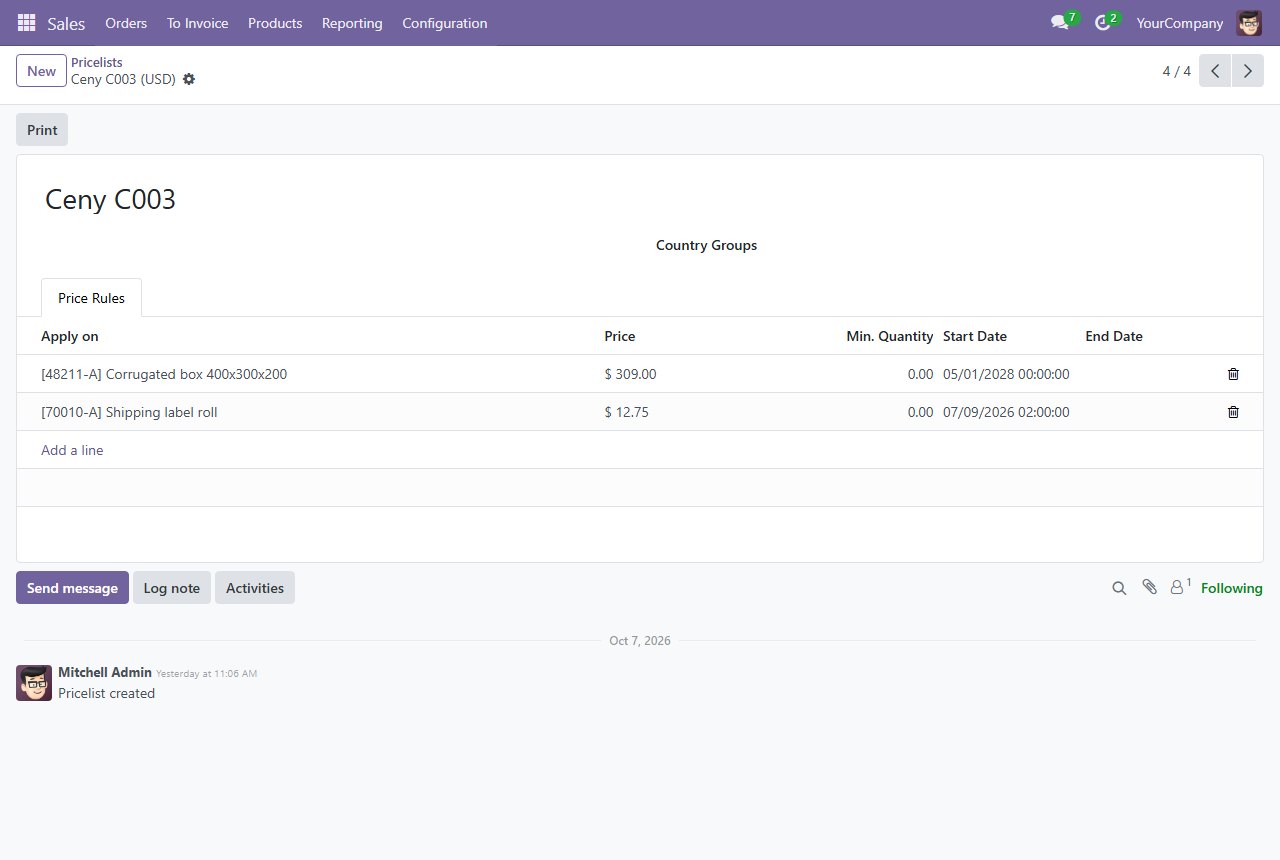
After every run Maptelo asks the system itself — through an API or the database, never the screen the robot clicked on. On the left is the run from the film: an AI agent asked for a price change, and Maptelo returned the result with its proof.

Proof of the runOdoo 18 · test data
process
odoo_customer_price (a customer price in a price list)
requested by
an AI agent through MCP
inputs
Ceny C003 · 48211-A · 309.00 from 2028-05-01
read-back
Odoo database: price 309.00, matches 1
time
1.44 s
outcome
VERIFIED
A screenshot from the end of the run: the Odoo price list with the new price.
OutcomeWhat it meansWhat next
VERIFIEDDone and confirmed by an independent read. The only success.Finished.
HALTED_SAFEStopped before saving, nothing changed — for example a dry run.Can run again once explained.
BUSINESS_EXCEPTIONA known business exception — for example, the product does not exist.Goes into the report.
NEEDS_RECONCILIATIONAn uncertain save: the screen says “OK”, but the read does not confirm it.A person checks. The robot does not retry.
SYSTEM_FAILUREA technical error before saving.Safe to run again.
REJECTEDBad inputs. The run never started.Fix the inputs.
COMPLETED_UNVERIFIEDThe steps passed, but the process has no way to check the result. Not a success.Add a check.

03

The Odoo 17 → 18 upgrade, without a single false success

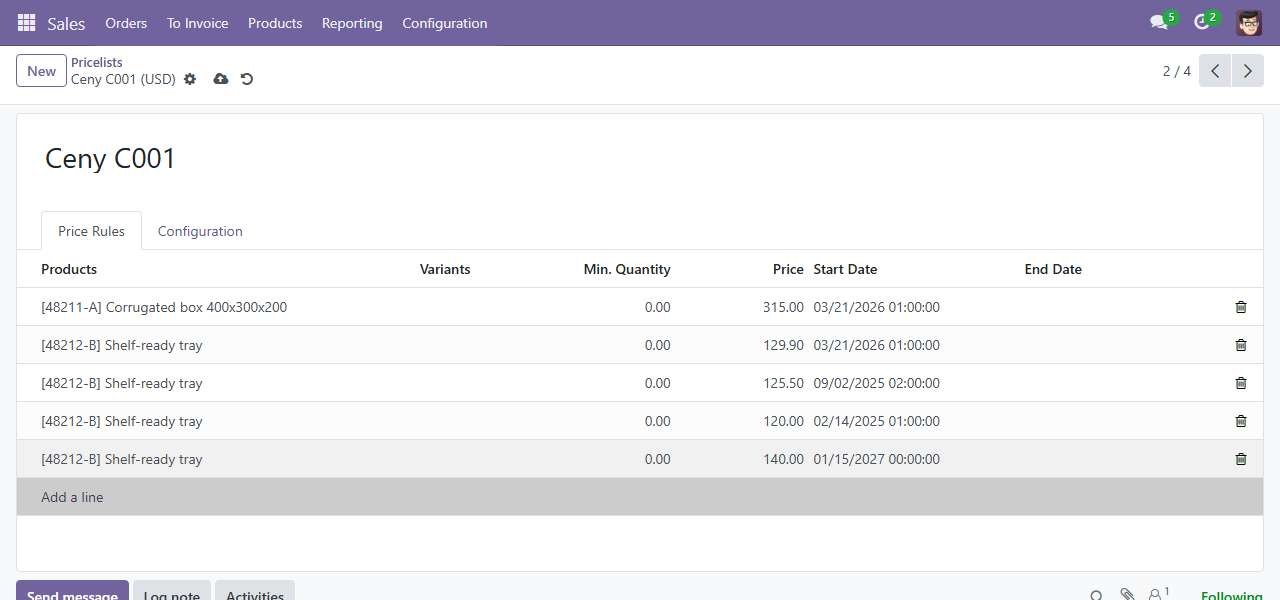
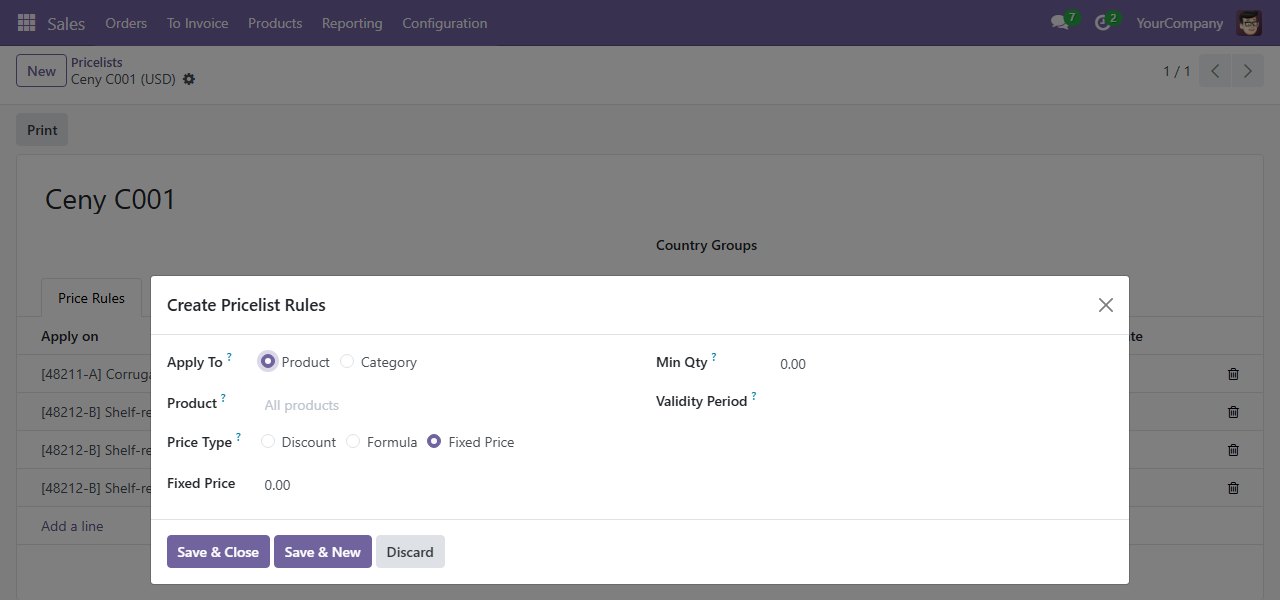
Robots usually break after an application update. I ran a process built on Odoo 17 after the upgrade to Odoo 18: screen addresses, column names and the very way of adding a price had changed. A table row had become a dialog window.

The price list in Odoo 17: a new price is added as a table row.
Odoo 17 · a new price is a table row
The price list in Odoo 18: the same change in a dialog window.
Odoo 18 · the same change in a dialog window
  • 01

    Maptelo found the moved screens and fields by itself: by the screens’ landmarks, and in harder places with help from a language model.

  • 02

    Where the way of saving itself had changed, it stopped without saving instead of guessing.

  • 03

    A repair reaches a new version of the model only after a VERIFIED run and a person’s approval.

0false VERIFIED

0bad writes

04

Maptelo Studio: record, build and run without a terminal

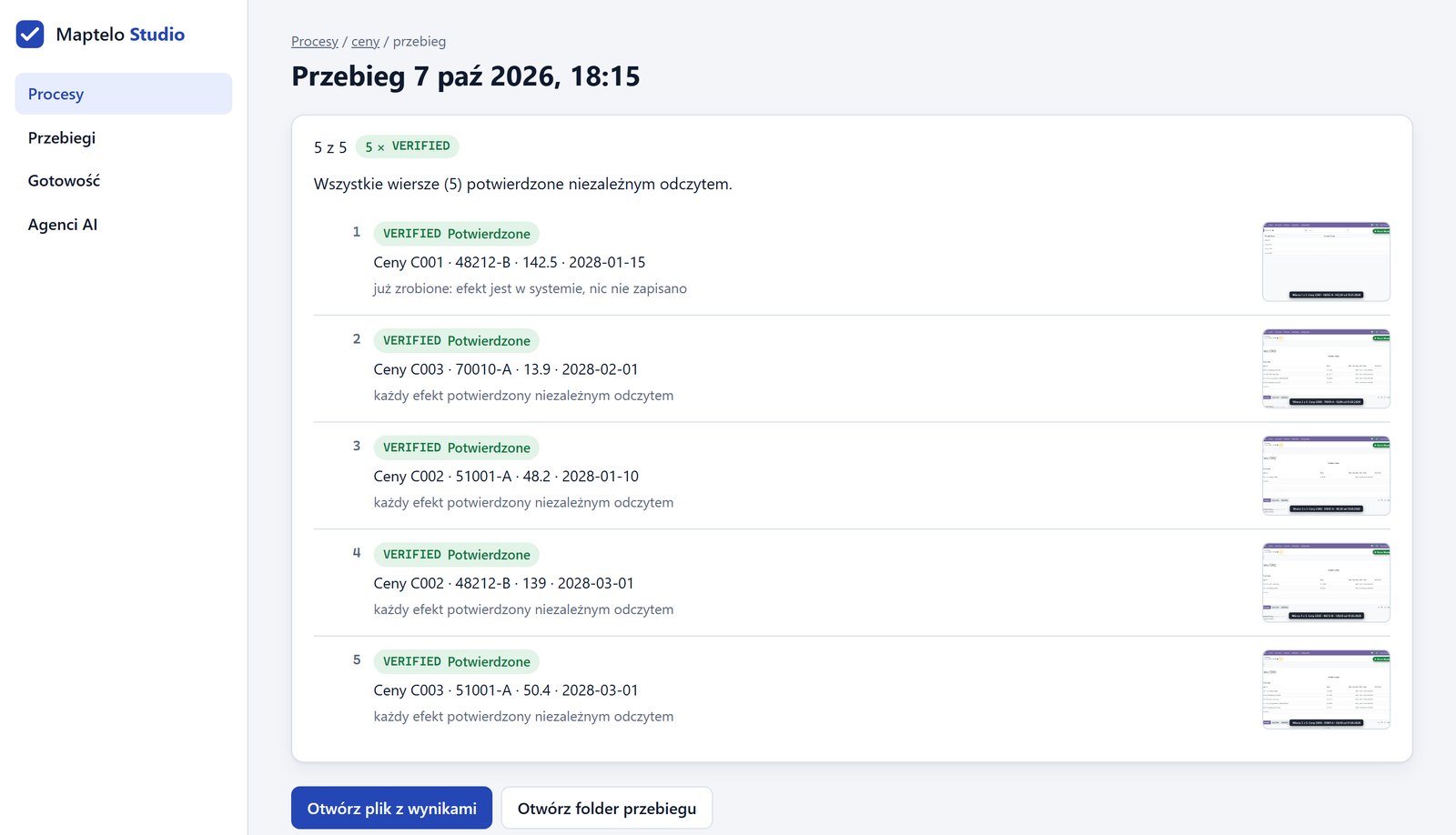
Studio is a page available only on the computer where Maptelo runs. It shows every process, its steps and its data, and a run on a sheet can be watched row by row, with a screenshot behind every result.

Maptelo Studio: a run of five spreadsheet rows, each VERIFIED with a screenshot.
A run on a sheet · 5 of 5 rows VERIFIED, a screenshot for each
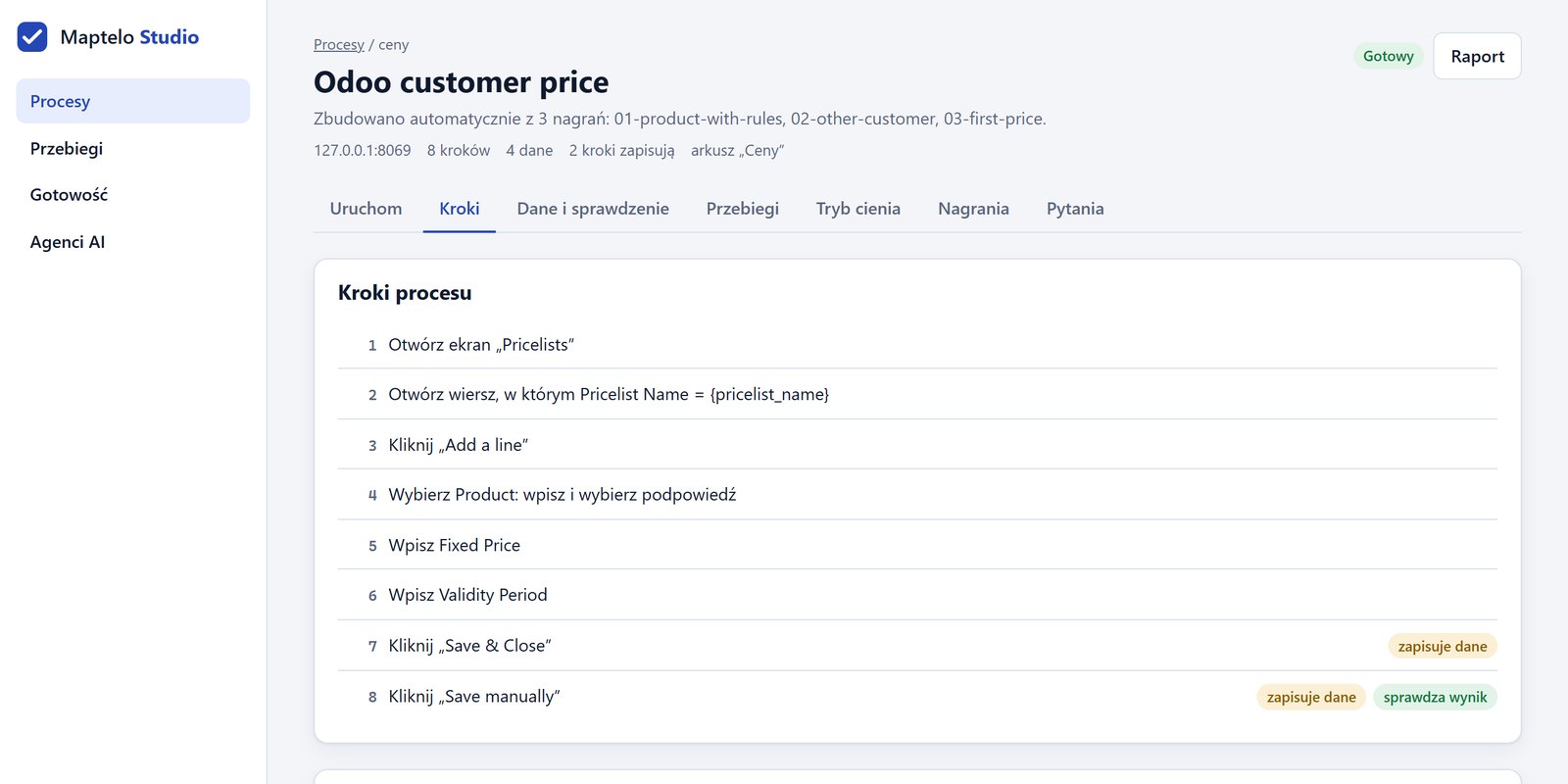
Maptelo Studio: the eight steps of a process, marking the steps that save data and check the result.
The process model · steps that save data and check the result
  • 01

    You record a demonstration and build a model from it with one button.

  • 02

    You answer the program’s questions where demonstrations differ.

  • 03

    You run the process on a sheet, and the results go back to its copy: a status and a note next to every row.

05

It runs on your computer, like Power Automate Desktop

Maptelo is a program for the computer of the person who does the process, not a cloud service. Process data stays inside the company.

01

On your computer

Recording, the model, the robot and the proof all run locally. You use it through Studio in the browser or through commands in a terminal.

in progressan app window of its own and a Windows installer

02

Your browser and your sign-in

The robot works in Edge or Chrome, in a separate profile that remembers the company sign-in. You sign in yourself, once, in an ordinary browser window.

03

Data stays in the company

Recordings, models, results and screenshots are files on your disk. Private mode covers data in screenshots, and the model keeps no example values.

04

AI only when you turn it on

After screens change, Maptelo can ask a language model to help with a repair. Without it, runs are fully repeatable — and a read of the system always decides the result.

05

An AI agent gets a tool, not access

You can offer an approved process to an AI agent such as Claude, through MCP. The agent sees only the tool and a result with proof — never a password or a session.

06

And the server?

Only for this page and for downloading the program. A team version, if there is one, will run on a server inside the company.

06

Measured, not promised

Tested on two versions of a real ERP, Odoo 17 and 18, and on a test application of my own — with test data only.

automated tests on every change, including full runs in a browser
406
possible run outcomes; there is only one success: VERIFIED
7
sheet rows VERIFIED in the film; the row already done during the demonstration was checked and skipped
5 of 5
false VERIFIED and bad writes after the Odoo 17 → 18 upgrade
0
Odoo versions tested, plus a test application of my own
2
for a call by an AI agent, including the database read and a screenshot
1.44 s

Automation is ready only when it can prove that it worked.

Next: a Windows installer and a pilot on a process at work — only with the IT department’s approval and a data-protection review. Why I built it, and what testing on a real system taught me: A robot that has to prove it worked.

← All projectsHome